Monday, 20 February 2017

Sunday, 19 February 2017
Just Published! Keywords, Hashtags and You, Oh My!
Are you making mistakes that keep you broke, without customers, readers or the success you deserve?
If you’ve been wondering why your social media marketing strategy hasn’t been working, look no further for understanding than What Is Social Media Today: Keywords, Hashtags and You, Oh My!
Our second book about social media marketing follows What Is Social Media Today: Get Ready to Win the Game of Social Media.
“Many people adopt a hope and pray approach when it comes to operating a business, trying to sell books or searching for new customers in the social media,” says author Catherine Carrigan.
“What Is Social Media Today: Keywords, Hashtags and You, Oh My! teaches you a simple, highly effective system so that your good work can get discovered and you can make the money you deserve.”
What you will learn in What Is Social Media Today: Keywords, Hashtags and You, Oh My!:
- Why you can’t just sit around and expect clients, customers and readers to find out about your business, products, services and books
- Why you can’t just start a Facebook page for your business and expect customers to discover you
- Why most entrepreneurs fail at social media
- How to avoid the common mistakes that keep you broke and frustrated
- The five stages of change you go through when approaching social media marketing
- The five kinds of entrepreneurs for whom social media is absolutely essential
- How to get Page 1 of Google without spending money on advertising
- What is a keyword
- How to find the best keywords for your business
- What the heck is a hashtag
- How to find the best hashtags to use in your social media strategy
- The top 7 responsibilities of a social media manager, even if you’re doing it all yourself
- The top kinds of content you can create to establish your brand identity
- 7 steps to build your tribe in social media
- How to play the Game of Social Media for fun and profit
- You’ll also receive a coupon for $500 off our program at www.whatissocialmediatoday.com
Author Catherine Carrigan has published seven books, including four Amazon No. 1 bestsellers.
She is a medical intuitive healer.
Catherine became a social media entrepreneur and authorpreneur after the publication of her second book, What Is Healing? Awaken Your Intuitive Power for Health and Happiness.
“I started in social media to get the word out for people all over the world who need my work and my books,” Catherine Carrigan says. “Social media can be fun and effective.
“I put together a social media marketing training business with Ramajon Cogan, who has been working with authors for five years, because most authorpreneurs and entrepreneurs are not financially successful due to their lack of a consistent social media marketing approach.
“Ramajon Cogan and I call our system the Game of Social Media.
“Join us today to discover how to rocket your business and books to success by learning how to win the Game of Social Media.”
At present, Catherine’s Social Authority is 68, which puts her in the top 14.6 percent of Twitter users worldwide. She is consistently among the top 100 Twitter users in Atlanta, Georgia.
Her score on Klout, a broad-based measurement of average influence across Twitter, Facebook, Google+, Instagram, LinkedIn and Tumblr, is 68. The average Klout score is 40 on a scale of 1 to 100, with the president ranking at 99.
Want to learn more about how you can Win the Game of Social Media?
Putting all this together takes time and is part of creating a successful social media strategy.
We’ve got four ways for you to learn:
- Weekly webinars that you can join LIVE or listen to at your convenience
- One on one coaching
- Peer competition
- A forum with resources where all your questions can get answered
Join Catherine Carrigan and Ramajon Cogan at www.whatissocialmediatoday.com and we will show you how! Call Catherine Carrigan today at 678-612-8816 or email catherine@catherinecarrigan.com or contact Ramajon Cogan at (928) 821-4553 or email wheresramajon@gmail.com.

Hashtags, Keywords and You Oh My! by Catherine Carrigan
The post Just Published! Keywords, Hashtags and You, Oh My! appeared first on What is Social Media Today.
source http://whatissocialmediatoday.com/just-published-keywords-hashtags-and-you-oh-my/
source http://whatissocialmediatoday.blogspot.com/2017/02/just-published-keywords-hashtags-and.html
Friday, 17 February 2017
#SproutChat Recap: Productivity for Marketers
Social media marketers have a plethora of productivity apps and platforms in their tool boxes. But figuring out how to best utilize various softwares and workflows can be challenging. This week at #SproutChat, we were joined by Lolitta Gevorkova, Social Media Specialist at Evernote. We discussed how social media marketers can get the most out of their business day, business goals and tips and tricks for increasing productivity.
Managing Your Content Calendar
Managing a content calendar is no easy task, especially when multiple teams are involved in the creation and curation of content. Lolita provided tips for using Evernote to manage your content calendars and our community chimed in with their own processes.
A1. SM moves FAST & organization is key. We use Evernote for content calendars, asset libraries, & more. https://t.co/PPer8VPoba #SproutChat pic.twitter.com/mXEC5XL2OV
— Evernote (@evernote) February 15, 2017
A1: I use @evernote to store ideas, then move them into a calendar template for my full editorial calendar. #SproutChat
— Express Writers (@ExpWriters) February 15, 2017
A1: I write all my blog posts and blog topic ideas with @evernote #SproutChat https://t.co/DSreBEhZ1k
— Josephine Borrillo (@70mq) February 15, 2017
A1: I use @evernote to plan out content in a calendar, draft posts and create to-do lists for each client #SproutChat
— Searcy Sledge (@SearcySledge) February 15, 2017
A1. You can use @evernote for organisation, content management and communicate with your immediate team. #SproutChat
— Bianca DeLeon (@deleonbiancam) February 15, 2017
Collaborate Across your Team for Maximum Productivity
Collaboration is the key to success for any organization. Identifying your team member’s strengths and assigning tasks is a must. Our #SproutChat community weighed in with their most effective team productivity hacks.
A2a. Organizing, planning, & getting ahead! Learn how to collaborate on a project with these tips. https://t.co/rDb8ihRcHr #SproutChat pic.twitter.com/93c9DsA5Nq
— Evernote (@evernote) February 15, 2017
A2b. Team collab. goes beyond apps. Our true secret sauce is inspired by @google’s Project Aristotle. https://t.co/tMp6DasiP4 #SproutChat
— Evernote (@evernote) February 15, 2017
@SproutSocial A2 …have a home base for the project where everyone knows and uses …#sproutchat
— Tim Elliott (@TimElliottUK) February 15, 2017
@SproutSocial A2: find platforms that make your life easier & win your team to them. This is *why* I got @evernote premium #SproutChat
— Travis Ham (@travisham) February 15, 2017
A2. Group chat threads are key (or group hangouts or slack channels or whichever) #SproutChat
— Reva Minkoff (@revaminkoff) February 15, 2017
A2: Communication=key to collaboration. Tools that show changes are really helpful, especially when writing/editing as a group #SproutChat
— Mallie Rust (@malliefe2o3) February 15, 2017
A2. Using electronic methods that the team has agreed upon. Ex: Instant Chat Messengers which are embedded in many apps as well. #SproutChat
— Eloquent Content (@eloquentcontent) February 15, 2017
Teams of One Should Take Note
Productivity tools aren’t just for teams. Individuals can benefit from tapping into productivity tools for reminders, automation, content scheduling and so more. When you’re wearing many hats and managing various tasks, prioritizing the productivity software features that save the most time is crucial.
A3a. Collecting research is crucial to a marketing strategy. Use our Web Clipper to save web articles → https://t.co/4PVa12cpME #SproutChat pic.twitter.com/FNhPThg3QX
— Evernote (@evernote) February 15, 2017
A3b. As a team of one, time is especially scarce. Save time w/ marketing persona and calendar templates. https://t.co/KwwWzHl8ZK #SproutChat pic.twitter.com/jGCuuF7atS
— Evernote (@evernote) February 15, 2017
A3: Make sure the tools you use are right for the job. You don't fix a toilet with a hair dryer. Strategize & consolidate assets #SproutChat
— Jeff Higgins (@AnnaMariaSocial) February 15, 2017
A3: Being a lone wolf gets hectic! Interactive calendars, checklists & notes-to-self can help you stay on top of all the to-dos. #SproutChat pic.twitter.com/bSm29ptdD4
— Driven Local (@DrivenLocal) February 15, 2017
A3) Time management, to-do lists by project and a deadline calendar are key to have when handling various tasks. #SproutChat
— Liliana H ☕️️ (@Liliholl) February 15, 2017
A3: It's hard to be marketing when you're alone. Probably the best way would be setting goals, calendars, and checklists #SproutChat
— Kelly Lovell (@kellyalovell) February 15, 2017
A3: it sounds cheesy but just blocking off time in your calendar and committing to getting things done helps a lot #sproutchat
— Breonna Bergstrom (@bmbergstrom161) February 15, 2017
Get the Most out of Your Software
The best features within a software are often “hidden.” These lesser known capabilities provide marketers with the “a-ha” moment that changes the way they look at a tool and increases daily usage. Lolita shared her favorite Evernote “hidden” features and the rest of the community offered their own software must-haves.
A4a. Voice recording! Capturing interviews or brainstorms into a note w/ your phone is a game changer. https://t.co/uKVfHgGtBc #SproutChat pic.twitter.com/3EbPYgKY7q
— Evernote (@evernote) February 15, 2017
A4b. Did you know you can put emojis in note titles?! Our marketing favorites:
📅 Content Calendar
📈 SMM Reporting
📌 To-Dos#SproutChat— Evernote (@evernote) February 15, 2017
A4 The web clipper is by far my favorite feature! I like that you can do full screen or just parts #sproutchat
— Shannon Williams (@Shannon_L_W_) February 15, 2017
A4 @evernote is free? Most folks are on a tight budget, but evernote always comes through as an affordable option for any use! #SproutChat
— HeyOrca! (@HeyOrca) February 15, 2017
A4: Web clipper is my fave, along w/ ability to e-mail a note w/ tags attached & have it arrive in the right notebook. #SproutChat https://t.co/5RClUljuUf
— Tim Mohler (@TimothyMohler) February 15, 2017
A4: Well, I just learned that you can scan and upload written content, and now you tell me there's a recording option? Brilliant #SproutChat
— Venture Icon Media (@VentureIcon) February 15, 2017
Foster Growth & Encourage Community Engagement
For social media marketers, productivity also means fostering community growth and engagement–no matter how many other tasks are being assigned. The #SproutChat community knows this challenge more than anyone. Check out their best tips for achieving community while staying focused and prioritizing other asks.
A5a: In @SproutSocial, our marketing & support teams collaborate to engage w/ our community. Communities thrive in conversation. #SproutChat pic.twitter.com/fJvYlObt71
— Evernote (@evernote) February 15, 2017
A5b: Events are key to our community engagement. Our strategy includes: Periscopes, Facebook Lives, webinars, & offline events. #SproutChat pic.twitter.com/MMGcaRXkVg
— Evernote (@evernote) February 15, 2017
A5: Really listening, whether to coworkers or clients. @evernote helps organize your takeaways & turn them into actionable steps #sproutchat
— Brandfolder (@Brandfolder) February 15, 2017
@SproutSocial A5: Ask your audience questions and allow them opportunities to voice their opinions! #SproutChat
— nicole (@nicolemaries__) February 15, 2017
A5: If you want more engagement from your community, you have to step up and start conversations. #SproutChat
— Express Writers (@ExpWriters) February 15, 2017
A5: Be the first to engage. Support is a 2 way street, and you can only expect engagement if you reach out first. #SproutChat https://t.co/7qO0S1SmmE
— Metter Media (@mettermedia) February 15, 2017
@SproutSocial A5: Lead mainly by sacrificially serve them and putting their needs ahead of your own #SproutChat
— Travis Ham (@travisham) February 15, 2017
A5) You foster+engage communities when: accessing information is easy, but secure; you respond to requests & facilitate sharing #SproutChat
— Liliana H ☕️️ (@Liliholl) February 15, 2017
Next week, #SproutChat will discuss how to create great video content. Until then, join our Facebook community to stay connected.
This post #SproutChat Recap: Productivity for Marketers originally appeared on Sprout Social.
source http://sproutsocial.com/insights/productivity-for-marketers/
How to Produce Affordable Content Without Sacrificing Quality
Is it really possible to produce affordable content without sacrificing quality?
Any marketer worth their salt should know how important it is to update a website with fresh and relevant content on a regular basis. Google loves content. Customers love content. Content is king. Amen.
But quality content is expensive.
An average market price for a 1500-word article of a decent quality is around $70.
If you suffer from perfectionism, you would need to fork out around $100 (and very often even more) for a superior quality piece of writing.
And it's just one article!
If you post around 3 to 5 pieces per month, it sums up to an average of $300-$500.
You probably won’t be surprised if I tell you that this sum can be lowered significantly.
In most cases, lower price goes hand-in-hand with lower class content.
However, there are ways to produce affordable content without sacrificing quality of the material.
Today, I want to share those techniques with you.
Before you start producing content...
Prior to ordering any kind of content for your website, stop for a minute and think.
“Does this type of content really work for me?”
You see, not every expensive type of content is able to deliver your message in the most effective way. Different content types suit different niches and serve different purposes.
Here are some most popular content types and their approximate prices per piece:
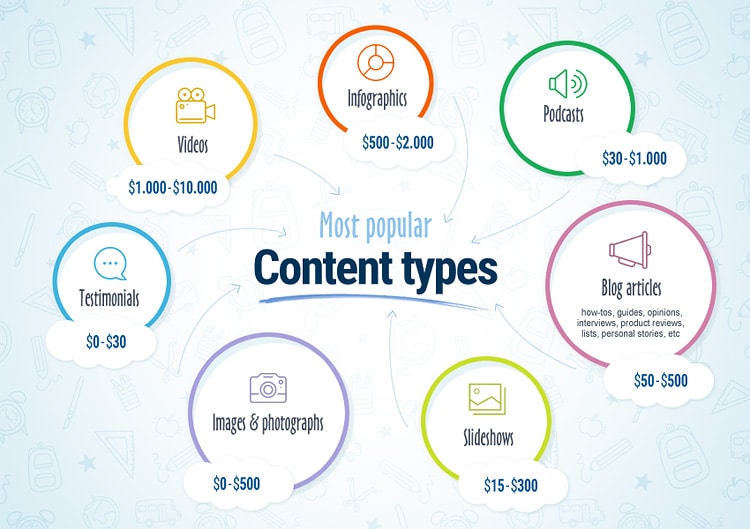
If you've been in your business for quite a while, it will be easier for you to identify what type of content you should focus on.
Say you have infographics, blog articles, and videos on your website. To identify their cost effectiveness, you need to know two things: one, price; and two, popularity metrics (number of views, shares, comments, etc.)
Example:
An infographic that cost you $900 got 2500 views;
- You paid $250 for an article and it got viewed 2000 times;
- A video that is worth $2000 got 1000 views;
If you divide the cost by the number of views, you'll know how much one view costs you.
An infographic is worth 0,36 cent.
- An article – 0,125 cent.
- A video - $2.
At this point, it is clear that two most cost-effective types of content in your case are infographics and blog articles.
This is how you identify your type of content in order to cut expenses on something that does not pay off in any way.
If you are just starting to build up your audience, spend some time on your competitors’ websites analyzing their content.
Simply do what I’ve described above, and as you cannot know exact prices, use average ones.
Also, focus on quality rather than quantity.
10 low-quality blog posts may cost just as much as one good article, but then you won’t be able to identify real price per view (as there will be little or no views).
All the money you save in such way is not worth lost customers or lower Google rankings.
How do you actually stop spending so much on content?
- Written content
It is the most commonly used content type. It does an amazing job getting the message across. It sells, it educates. Google robots are after it—not to mention that it occupies the biggest part of any webpage.
I believe written content deserves a special treatment, so I will go ahead and dedicate the biggest part of this article to texts, words, and letters.
Here’s what you can do to stop spending so much on written content.
1. Update your old blog posts and articles.
It is truly the cheapest way to get fresh content for your website (in fact, it's free if you do it yourself). Go through your own archives and you'll definitely find content that can be either updated or reworked.
How do you know that your old writing needs some refreshing?
- The information in a blog post is outdated. What was acceptable back in 2012 might not be that adequate now. However, your audience still read those posts, and people need advice that would be relevant at the present time. The same applies to crazy designs that scream “Hello, welcome back to the age of CDs and chat rooms”.
- The topic is evergreen. People just can’t get enough of certain topics, period.
- You have more experience now and have much more to add. Did you find new apps that help fellow travellers book hotel rooms? Update.
Did you just try out an awesome link-building technique and it worked? Update. Did you discover a new way to combat skin issues? You know what to do! - You have more experience now and realize that you have changed your mind. Confess that you were mistaken and describe your new experience.
It takes courage, but people tend to grow both emotionally and professionally, and looking back at your past self you may find yourself thinking “Oh, boy.
I must have been possessed by an evil demon when I told people content marketing is doomed.” - The blog article is not popular and poorly written. Spend one or two evenings polishing and enriching articles you’re slightly embarrassed of.
You’ll get rid of low quality content and at the same time get fresh blog posts at practically no cost. Time for spring cleaning!
2. Reformat or repurpose your own posts
What I mean by that is that one and the same article can be used in many different ways. Here’s what you can do:
- use it as a script for a video
- use it as a script for a podcasts
- publish it as an infographic
- publish it as a slide presentation
- create an ebook (if you have enough content to work with)
All that is new content that requires very little work and money.
Apart from feeding an always hungry content monster, you’ll learn how your own audience reacts to unconventional content types (like videos or podcasts), investing less than you would have invested doing everything from the ground up.
Also, you’ll get an opportunity to expose yourself to new audiences if you decide to go a step further and republish your articles, presentations, videos, or podcasts on other niche websites.
3. Use rewriting instead of regular writing
In fact, rewriting is often given priority by website owners due to its effectiveness. It takes less time (as writers do not need to spend time on research), content is not plagiarized, and the quality is often high-class.
What is more - it is so much cheaper! If you pay $70 for an article written from scratch, it will cost you only $35-40 to have it rewritten. You can have your own blog posts rewritten or find information elsewhere on the Internet. Professional rewriters can transform articles into brand-new pieces of writing so nobody will accuse you of being dishonest.
Professional rewriters can transform articles into brand-new pieces of writing so nobody will accuse you of being dishonest.
Note: By professional rewriting I mean rewriting done by hand. Do not confuse it with rephrasing that various online article spinning and rewriting tools offer (unless you enjoy staying awake at night correcting grammar).
Apart from that, there’s a danger of getting plagiarized content, as machines do not add ideas or modify already existing ones. They simply rephrase.
Where to look for professional help: Writology, Proofessor, Paraphrasingservices.
4. Use freelancers instead of writing agencies
Yes, it takes time to find a suitable writer. Yes, freelancers are not cheap as well, especially if you hire native English-speakers. Yes, there are writers who fail deadlines and do not deliver what you expected.
Therefore, focus on beginners.
The reality shows that very often they are really hard-working and reliable. And even if they are foreigners, their English level is really good (however, it is advisable to test it beforehand). Apart from that, you’ll be surprised at the speed of their work and respect with which they treat their clients.
Young and aspiring freelancers do not charge much, as they do not have that much experience. What they do have is enthusiasm and diligence that allows them to produce high-quality work, as they need good feedbacks in order to get more clients in the future.
Prices start from $2 per article! Can there be anything cheaper?
Yes, there can!
5. Invite guest writers
Just like freshly-baked freelancers, young bloggers are on a never-ending quest for good reputation and opportunities for exposure. Even talented writers with tons of experience write for others from time to time, as such contribution translates into more traffic for their own blogs.
Therefore, let others know that you accept guest posts: you get free content and your guest writers get to promote their own blogs. However, be sure to write a clear and strict guest posting policy. Your site is no place for spammers.
You can also get in touch with some good writers by yourself. You definitely come across good guest posts on different websites from time to time. Why not invite their authors to write for you, too?
- Images
If written content is a means of communication, images usually serve as baits. They set the mood, make the text visually appealing, and get customers’ eyes glued to webpages for a long time.
Finding affordable images that would complement your articles is challenging, but possible.
Below you will find a list of resources that offer free or really cheap images that you can legally use on your websites:
· Pixabay. Offers free photos, illustrations, vector graphics, and videos. Attribution not required.
· Lifeofpix. A community of photographers sharing free pictures for everybody to enjoy. Amazing website design, extensive collection of high-quality pictures, no copyright restrictions.
· Publicdomainarchive. They update their database on a weekly basis. You can also get a premium membership for only $10 per month and download high-resolution photos in bulk.
· Fotolia by Adobe. Numerous free photos, vectors, illustrations, and videos. For some pictures, however, you need to pay, but the price is really affordable (just a couple of cents per image).
· Magdeleine. Some photos do require attribution, some do not. Make sure to check the license type before you download.
· Travelcofeebook. Offers amazing photos (mostly landscapes from travels all over the world). No attribution required.
· Gratisography. Pictures taken by Ryan McGuire are free to download. You may use them for whichever purposes with no attribution.
· MMT. Stunning pictures from Jeffrey Betts are free for commercial use.
Final words
As you can see, ways to protect your money and eliminate unnecessary spending do exist.
There are also other content types that are worth mentioning, but I decided to start with the most common.
Let me know in the comments if you need info on how to get cheap infographics, videos, podcasts, etc. It will be my pleasure to share my secret cheat sheet with you!
Author bio:
Jenna Brandon is a blogger, copywriter, and digital marketer at Writology.com.When she’s not busy studying Google algorithms and writing about link building, she takes stunning pictures of California or cooks pizza. Jenna is also an avid traveler, and she is secretly Italian at heart.
The post How to Produce Affordable Content Without Sacrificing Quality appeared first on Ninja Outreach.
source https://ninjaoutreach.com/produce-affordable-content/
Wednesday, 15 February 2017
Tuesday, 14 February 2017
Monday, 13 February 2017
Guest Post by Mindi Rosser: 115 Facts You Never Knew About Social Media
Mindi Rosser helps small to medium-sized B2B businesses—and their leaders—look awesome on social media. You can read her blog at this link.
The influence of social media is so overwhelming that it is hard to believe all of the big social media sites are only a decade old. Facebook, Twitter, Instagram, LinkedIn, and other popular platforms have the power to influence not only people’s social lives, but almost every aspect of the private and professional sphere.
NUMBER ONE SOCIAL MEDIA SITE
The most popular social media platform in the world is Facebook, with 1.59 billion users. Facebook logins account for 70% of all social media daily logins. Approximately 1.23 billion users log into Facebook for an average of 17 minutes each day. Facebook users generate 4,166,667 new likes, 136,000 new photos, 293,000 statuses, and 510 new posts every single minute.
SOCIAL MEDIA & NEWS
Social media platforms are slowly but surely becoming the leading source of news for millions of people around the globe. Reddit is the most popular social media site for reading news, followed by Facebook, Twitter, Tumblr, and Instagram. Facebook is the primary news source for 68% of millennials, while 24% of high school students stay informed through Instagram.
BRANDS & CELEBRITIES ON SOCIAL MEDIA
Big brands and popular celebrities know just how powerful social media is when it comes to reaching the right audience. This is why brands and celebrities take steps to maintain a strong presence on social media. Coca-Cola is liked by 98,332,327 people on Facebook, Chanel has 12,205,997 Twitter Followers and Lego has an incredible 2,957,749,263 YouTube subscribers.
The most popular celebrity on Facebook is the football star, Cristiano Ronaldo. Singer Katy Perry is one of the most followed celebrities on Twitter, and pop star Justin Bieber has a YouTube account with 11,728,143,967 subscribers.
Take a look at this comprehensive infographic from skilled.co to learn more about the influence that social media has on various aspects of modern life.

The post Guest Post by Mindi Rosser: 115 Facts You Never Knew About Social Media appeared first on What is Social Media Today.
source http://whatissocialmediatoday.com/guest-post-mindi-rosser-115-facts-never-knew-social-media/
source http://whatissocialmediatoday.blogspot.com/2017/02/guest-post-by-mindi-rosser-115-facts.html