Tuesday, 7 November 2017

Monday, 6 November 2017
Friday, 3 November 2017
Implementing PDF Exports
At some point nearly every SaaS company receives a feature request to export user data. The request usually comes in the form of “I want to export my data to a <Microsoft Office Product> file.” Here at Sprout Social we’ve gotten these requests before and today we support CSV and PDF exports for nearly all of our reports. Implementing CSV exports was relatively straightforward. Implementing PDF exports, on the other hand, was a more complicated beast. In this article I want to share with you the history of Sprout Social’s PDF exports and some of the issues we ran into in the hopes that it may help you should you choose to go down a similar path.
Beginnings
Early in Sprout Social’s life sometime in 2010, we received one of those data export requests. Our users wanted PDF copies of our reports so they could easily share data with teammates that didn’t use Sprout Social. Unfortunately for us, the options for generating PDFs at the time were fairly limited. There were a few command-line tools but they weren’t very flexible and didn’t offer great CSS support. Many browsers at the time offered the ability to print a web page directly to a PDF file, but it was a bit cumbersome for users and it was very difficult to add print styles to your page if it wasn’t designed that way from the start. So instead of an existing solution we decided to build our own, and shortly thereafter, Papyrus was born.
Papyrus
Papyrus is the internal name for our first PDF report generation service. It’s a Java service that accepts a JSON payload as input and uses a library called iText to generate a PDF. Although some of the details are a bit complicated, using Papyrus to generate a PDF is relatively simple.
iText uses an XML-based markup language and a subset of CSS to create and style PDF documents. We know the layout of our PDFs beforehand, we just don’t know the content. Using Mustache, we can create templates of our reports that can be filled in with user data at generation time. Once we combine a user payload with the template to produce the full markup, iText can generate a PDF document to return to the user. We employ a few tricks to generate the PDFs—such as using Rhino and Highcharts to generate graphs—but a majority of the heavy lifting is done by iText. Most of our work lies in creating the templates for each of the reports.
While Papyrus has the benefit of simplicity, it also has a few drawbacks. Most notably, the templates are onerous to create and difficult to match to designs. We’re also forced to duplicate display logic in the markup and on the front-end, meaning that both back-end and front-end developers have to be involved in creating and modifying the reports. Because of these drawbacks, we started searching for alternatives in early 2014.
PhantomJS
By 2014, PhantomJS was becoming increasingly popular in the web development world. Most usage was focused around browser automation and testing, but one of its lesser known features is its ability to perform screen captures. Relevant to our use case, it can capture the contents of any web page in a PDF file. Using this feature we set out to build a service that would generate PDF reports based on the contents of the report’s page in our app.
We soon had a prototype for a new PDF generation service that could take screenshots of our existing reports. It wasn’t an out-of-the-box solution, however. We had to modify several parts of our application to make the reporting pages compatible with the way we were using PhantomJS. Some of those changes included:
- CSS workarounds. PhantomJS 1 is based on older versions of WebKit, which led to a lot of our CSS not working in PDF mode. In most cases, we had to fall back to using IE9 workarounds for PhantomJS.
A Function.prototype.bindpolyfill. PhantomJS 1 notoriously doesn’t supportFunction.prototype.bindeven though it implements most of the rest of the ES5 standard.- Fonts. If you search for “PhantomJS fonts” you’re likely to come across an article that will show you how to get PhantomJS to recognize local fonts. Put the fonts in
/usr/share/fonts/truetypeand then runfc-cache -fv. That works great until you also run into the issue where PhantomJS doesn’t implement the CSS font-family declaration correctly. This issue wasn’t found until we were in production and our Typekit fonts failed to load. - A custom version of the reporting page. If PhantomJS took a screenshot of the report as-is the PDF would include a lot of unnecessary content such as navigation bars, headers, and footers. The page also wouldn’t look very good because the contents weren’t optimized to fit on a standard PDF page. In order to work around this we created another web page that would only render the content necessary for the PDF, and in a layout that made sense for a PDFs. This meant we had to duplicate some layout code, but a majority of the components (graphs, charts, media objects, etc) were still able to be re-used.
- Authentication. Because PhantomJS didn’t have the user’s cookies we had to choose between side-loading data on the page or finding a way to authenticate PhantomJS to make API requests on the user’s behalf. Because of security concerns at the time we opted to side-load the data onto the page. That meant the front-end would have to gather all of the necessary data and ship it to PhantomJS when exporting a report.
The workflow turned out to be rather complicated, but it worked.
- The user initiates a PDF export and the front-end gathers the required data in a JSON payload.
- A request is sent to the PDF service, which starts an instance of PhantomJS and points the browser to the reporting page.
- The user payload is injected onto the reporting page and the page uses the data to render the report.
- PhantomJS captures the page in a PDF that is uploaded to S3.
- The S3 URL is returned to the client and the PDF download is initiated.
It lacked the simplicity of Papyrus, but it alleviated some of the frustrations we had with Papyrus. Not only were the reports as vibrant as the web versions, but now all of the logic for PDFs lived in the web code. An entire report could be designed and implemented by the front-end team, making them easier to develop and easier to ship. Seeing the potential in the new method, we sought to improve the service.
The New PDF Generator Service
After working with our PhantomJS-based service for a while, we started to identify some areas that would could improve the workflow. Most notably:
- Testing PDFs was difficult. Because the way the service generated report URLs wasn’t configurable, developers had to set up their own instance of the service in order to test reports outside of production.
- We weren’t utilizing PhantomJS to its full potential. Our prototype worked, but we soon realized that PhantomJS had features that could simplify our workflow. For instance, the
onInitializedhook would allow us to inject data directly into the page instead of uploading it to a server only to have the page re-download it. We also never properly enabled the PhantomJS disk cache, which would cut down on page load times if we configured it correctly. - The service used a fixed version of PhantomJS. We sometimes upgraded the version, but we had to upgrade every report at the same time. Making the version configurable would allow each report to operate independently of the others.
- Error handling was not a first-class concern. It was incredibly difficult to debug Javascript errors that occurred on the PDF reporting pages.
Using what we had learned from the first version we began to implement version 2 of the PhantomJS PDF generation service. We took a deep dive into PhantomJS’s documentation and source code and utilized more of its features. We were able to inject data directly into the page and enable the disk cache which resulted in our generation times dropping by as much as 40%. We made nearly every aspect of the service configurable, from the version of PhantomJS used to the URL of the report to the generation timeout.
In version 2 we made large strides in our error handling, since this was our biggest pain point. We utilize every error hook available in PhantomJS to ensure that any and all errors are captured in the log files. Errors are categorized by where they happen and how serious they are. They’re also given error codes to return to the client to help debug customer issues in production. Any request that fails in production is logged along with the contents of the payload, allowing us to reproduce the request later if needed. We also have a test page that sends raw payloads directly to the PDF generation service, allowing us to bypass the UI and the API when reproducing customer errors and reducing the amount of time it takes to find the cause. Because of the increased error-handling surface area, we saw our service losses go from one or two a month to zero in the last 16 months.
As part of our refactor we also modified our front-end code to create payloads that were smaller. Instead of sending raw request data to the service—most of which wasn’t used—we began to send processed, aggregated data. In some cases we cut down the payload size by a factor of 10. These changes combined with the efficiencies mentioned above means that reports are now taking 5 to 6 seconds to generate instead of the previous 20 to 25 seconds. And that time continues to decrease as we continue to make optimizations and switch more of our rendering logic to React.
When we finished the wave of improvements, the workflow was nearly identical. But by tackling some low-hanging fruit we were able to lower request times, lower error rates, improve the debugging experience, and expand the feature set. And using the new ability to specify a PhantomJS version enabled us to update our reports to PhantomJS 2, which is not only faster but also requires fewer CSS and JavaScript workarounds to generate our PDFs.
Since we launched the new PDF service 16 months ago updates have been few and far between. Its flexibility has allowed us to add new reports without any changes to the service. And the reliability of both the service and PhantomJS 2 has allowed us to start designing larger features around PDFs without worrying about scalability. This isn’t the final chapter in the book of PDFs at Sprout Social, but we are in a good place and we’re excited to see what the future holds for us and our customers.
This post Implementing PDF Exports originally appeared on Sprout Social.
source https://sproutsocial.com/insights/implementing-pdf-exports/
#SproutChat Recap: Planning Social Content for the Holidays
With the start of November, the holiday season is on everyone’s minds. For some, this means increased engagement and customer service inquiries on the rise. In this week’s #SproutChat we talked about planning social content for the holiday (plan early, plan often), UGC and global recognition of holidays.
Start Planning Early
Try to get ahead of the hectic season and avoid planning holiday content as it comes. Even if the holiday season is not your brand’s busy time, it’s likely clients and team members will be out of the office, so allow yourself the freedom later on by tackling things early on.
A1: Two words: "in advance." Clients go on holidays too – the sooner you deliver content to get their approval, the better! #SproutChat https://t.co/UKoPVCisU4
— Chatterkick (@Chatterkick) November 1, 2017
A1: Create a schedule in advance. Some social media posts for the holidays will be last minute, but most require planning. #sproutchat
— Netvantage Marketing (@netvantage) November 1, 2017
A1: You have to plan in advance for holiday content. No one wants to scramble to put something together at the last minute. #SproutChat
— Express Writers (@ExpWriters) November 1, 2017
A1: I first brainstorm ideas for holiday contests, videos, blogs, etc. #SproutChat
— Digital Addicts (@digitaladdicts_) November 1, 2017
A1: Our clients give us their goals for the holidays then we craft content we feel will support that goal. #SproutChat
— Dave Macdonald (@rdavemacdonald) November 1, 2017
A1: Think about all of the holidays. And how your content can naturally fit in with the season. #SproutChat
— Kevin Juliano (@KevinJJuliano) November 1, 2017
A1: We're fortunate that we have the same recurring events in our destinations. A lot of our previous content can be re-dated.
#sproutchat— Brad Lovett (@Brad_Lovett) November 1, 2017
A1: Decide on holiday promotions at least 3 mos prior to plan out calendar, set up copy/image assets, create posts, ready promos #sproutchat
— Kari Embree (@KariLikeSafari) November 1, 2017
Engagement Will Vary
Depending on your brand and organization’s objectives overall, engagement may fluctuate. It’s likely if you have a commerce component that you’ll see an uptick in customer service inquiries, so make sure your customer care plan is buttoned up.
A2: Definitely an increase in interaction. Emotional tie to the holidays plus a tie to your brand are home runs! #SproutChat pic.twitter.com/82ldNdTOCJ
— Kevin Juliano (@KevinJJuliano) November 1, 2017
A2: It can vary by client. Our holiday content usually sees excellent engagement, since it's so people-focused. #SproutChat [TK] pic.twitter.com/tscBub9cla
— ModSquad (@modsquad) November 1, 2017
A2: Level of engagement varies by client and campaign. E-commerce efforts tend to increase. Contests drive engagement too. #SproutChat
— Sortis Marketing (@SortisMarketing) November 1, 2017
A2: Always an increase surrounding compelling/adorable photos from events. People want to see photos that make their <3 feel good. Usually a dip in engagement surrounding advice/educational content. #SproutChat
— Kathleen Gormley (@KathGorm) November 1, 2017
A2: Expecting to see a boost in engagement with the launch of a holiday giving campaign – getting people excited about donating! #SproutChat
— Paige Doerner (@PaigeDoerner) November 1, 2017
A2: Increases, especially with retail clients. @instagram is a great place to do promotions and integrate shop features. 🎁 #SproutChat https://t.co/jtqZNr3E9U
— Chatterkick (@Chatterkick) November 1, 2017
Recognize Your Audience
If you handle a global brand’s social presence, be cognizant of how your holiday messages may come across. Avoid alienating portions of your audience by focusing on sales content that’ll drive those end-of-year numbers.
A3: Be inclusive! Explore different cultural traditions and highlight celebrations across the globe. #SproutChat [TK]
— ModSquad (@modsquad) November 1, 2017
A3: Do: be authentic, be responsive, be creative, be fluid, be true to your brand voice and guidelines, provide helpful information, plan far in advance but remain flexible. Don't: lie, go silent, be afraid to take risks with creativity. #SproutChat
— Kathleen Gormley (@KathGorm) November 1, 2017
A3: Do: Be all-inclusive. Consider all religions and beliefs. Don'ts: Ignore your social even if engagement numbers are low. #sproutchat
— Netvantage Marketing (@netvantage) November 1, 2017
A3: Do recognize the holidays, but don't alienate those with different beliefs and religious affiliations. #SproutChat
— Sortis Marketing (@SortisMarketing) November 1, 2017
A3: Be respectful of religious and national observances in different countries. Use geotargeting wisely and carefully! #SproutChat https://t.co/464iq5E2HV
— Chatterkick (@Chatterkick) November 1, 2017
A3: Don't be overly sales-focused! Create content that people will want to share to get the most mileage out of each post. #SproutChat https://t.co/y5jGhrtSZQ
— Houndstooth Media (@houndstoothmg) November 1, 2017
A3: Make sure you're creating content that will resonate with your diverse audience. #SproutChat
— Express Writers (@ExpWriters) November 1, 2017
A3 Stick to your content strategy rather than concentrating on the holiday #sproutchat
— Toby Metcalf (@Toby_Metcalf) November 1, 2017
Show off Company Culture
For B2B companies, the holidays are a great time to showcase your company culture. In a season where your overall engagement may be going down, take this opportunity to tap internal employee advocates to their share visuals of office outing and happenings.
A5: Showcase examples of staff who give back in their community and provide education on certain conditions and efforts to reduce stigma, and photos of the intense amount of decorations that adorn our units. #sproutchat
— Kathleen Gormley (@KathGorm) November 1, 2017
A5: Video and streaming is your new friend, but images and subtle words would leave long lasting impressions.#SproutChat https://t.co/87IoSVVpYh
— Dhaval Shah (@dhavalgshah) November 1, 2017
A5: Press releases/blog posts about any charity events/work is also a nice way to show how your brand cares. #SproutChat [TK]
— ModSquad (@modsquad) November 1, 2017
A5: Show the human side of things associated w/ these holidays – generosity & gratefulness – with the humans that we work with. #SproutChat https://t.co/H34INbLWoX
— Chatterkick (@Chatterkick) November 1, 2017
A5: Showcase the people that make your company special. @SproutSocial did a great job of that with their recent Halloween video. #SproutChat
— Dave Macdonald (@rdavemacdonald) November 1, 2017
A5: It's a great time to show off what makes your company different! Have fun with it and add some personality to your posts. #SproutChat https://t.co/I5GOEeiSZN
— Houndstooth Media (@houndstoothmg) November 1, 2017
A5 We make sure we're documenting our holiday festivities (ie: potluck lunch, volunteering, ugly sweater contest). #sproutchat
— Martin Lieberman (@martinlieberman) November 1, 2017
A5: We share pictures of our office decorations to show our holiday spirit & we have an album of our staff as kids on Christmas! #sproutchat
— Netvantage Marketing (@netvantage) November 1, 2017
A5. Build your company with activities and festivities and use that as content. Be real!😀 Don't just try to show off your brand #SproutChat pic.twitter.com/TPRC854o5r
— Venture Icon Media (@VentureIcon) November 1, 2017
Join #SproutChat next Wednesday to chat with Sprout All Star Elite, Kellen McGugan, of BigWing, about overcoming challenges in agencies. Until then be sure to join our Facebook community to connect with other brilliant folks in the industry.
This post #SproutChat Recap: Planning Social Content for the Holidays originally appeared on Sprout Social.
source https://sproutsocial.com/insights/sproutchat-holiday-social-content/
Thursday, 2 November 2017
Social Gaming - The future of Social Media
Social Media and virtual presence are words synonymous with each other. Today, each person or business has a social media presence.
Businesses, no matter how big or small, have their social media handles to reach out to a larger audience, who prefers to shop from the comforts of their homes.
The last two decades have seen a severe rise in the world of social media.
It all started with Orkut, a social media platform owned and operated by Google.
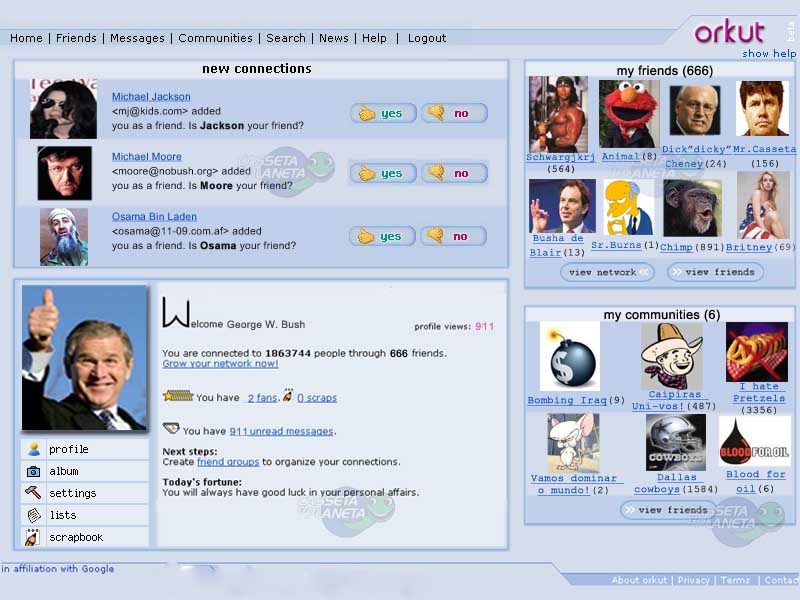
The platform was designed to help users meet new and old friends and maintain existing relationships.
With the passage of time, other platforms for social interactions came up and became more popular.
With the advent of Facebook, Twitter, Instagram, Linkedin and the likes, the people were taken by a storm in the world of social media.
Today, the social media pundits have many forecasts about the future of social media from here on..
When thinking about the future of social media, there's way too much to cover right here in any detail.
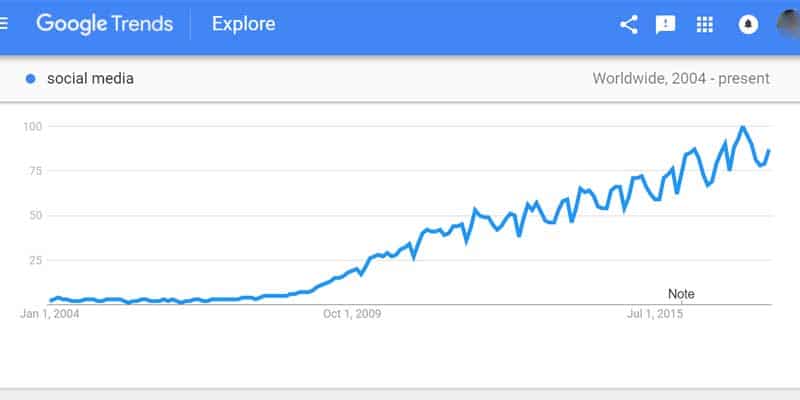
Social media interest over time
So we may just want to talk about one of the many trends that we're going to see developing on a larger scale over the next couple of years.
What we can see happening more and more is that people are shifting away from your standard social channels and finding ways to be social using other apps, particularly video game apps.
Video games and social media are rapidly merging together to the point that many hardcore gamers socialize primarily through gaming platforms, whether through their desktops at home or on their smartphones.
Mobile MMO games in particular have become massively successful, raking in millions of dollars.
For years, however, this was not the case.
A large group of unconvinced and sceptical people disregarded the trend of social gaming, branding it nothing more than a fad!
However, this changed when Facebook introduced Farmville and other social gaming platforms followed suit.
Social gaming apps can mean different things to different people. There are gamers – young and old – who routinely spend thousands of dollars per month on resource packs and speedups to help them advance in the games.
And it's not just a handful of spoiled, rich teenagers on the fringe of American suburbia.
We are talking about people of all ages all over the world pouring money into these games every day and spending several hours a day checking in on the game.
But on the social side, these games are taking the place of traditional social apps like Facebook and Twitter.
The new social apps aren't going to look like Facebook. Instead, those social interactions are going to be taking place in video game apps like Clash of Clans, Mobile Strike and Brutal Age.
A classic example of the advent and popularity of social gaming can be associated with the overnight success of Facebook application like Farmville.
If the Facebook model is anything to go by, the market potential of social gaming is huge.
Each day millions of people get out of bed each morning to plough their virtual farms.
What’s more, they’re willing to shell out money from their pockets doing so.
The Shift in Social Mobile Gaming
This built-in social aspect in video games has been around for several years now, with games like World of Warcraft and even Call of Duty on PC and gaming consoles.
On mobile, things were a bit different, though, at least in the mainstream mobile game market.
In most of the mainstream mobile games like Bejeweled, Farmville and Words With Friends, there was a social aspect to the games, but most of the people that you socialized with in those games were loaded in from your Facebook friends list, and there was a lot of interaction taking place within Facebook itself among those playing the game.
That is changing.
Today's mobile games almost completely cut Facebook out of the picture, other than as an easy way to upload an avatar/profile pic for use in the game.
So a few years ago, mobile gamers were socializing through Facebook, either directly or indirectly.
But now it's all taking place within the game app itself, and I think that's a significant shift that Facebook and other traditional social platforms are going to start to feeling as it impacts their numbers.
It's not inconceivable that many gamers will soon be ditching Facebook and Twitter entirely and doing all their online socializing within their video game apps.
In a very short span, social game developers like Zynga and Playfish have already made millions.
This has led many industry analysts to predict that the future of gaming certainly is somewhere between the current model of gaming and the one presented by social gaming.
Impact on Social Media Marketing
From a business perspective, what's interesting about these gaming apps is that they allow the game developers to easily sidestep many of the "rules" of Internet marketing and SEO.
If you've played Mobile Strike, for instance, then you know that there are several chat, mail and messaging features built right into the game.
And what jumps out at you almost everywhere you look in that game?
Advertisements are everywhere in Mobile Strike.
When you open the app – BAM! – you get hit with an advertisement to purchase resource packs to use in the game.
What is that icon constantly flashing over on the side of the screen? It's another ad.
Every day when you check the mail feature, what do you get? - Sales pitches that try to get you to buy resource packs.
There's also a "blog" which announces upcoming events and – you guessed it – sales on resource packs with all the special items you need to unlock new benefits and special abilities to dominate your enemies.
It's pure genius, because if this was being done on a website, that site would get a major penalty from Google and other search engines for being too spammy, with all the ads above the fold and the constant bombardment.
All those salesy mails would end up being blocked by spam filters too, if they were done via traditional email platforms, but here in the game app, anything goes.
It's enough to make any white hat SEO crap his pants, but it's a brilliant way to work around traditional safeguards, and those game developers are seeing big profits.
What’s more, social gaming happens to be the most intelligent and efficient way to get Internet users to provide their credit card information.
And it's unlikely that any of that would be possible without the social interactions that are becoming front-and-center in today's video games.
A few years ago, everyone was becoming addicted to Facebook for their social interactions.
But now people are becoming addicted to video game apps for the same reason.
Whatever way you may want to look at it, social gaming is definitely here to stay!
Tina Williams is a Digital Marketing Strategist and is responsible for the successful management of digital strategy for client brands based on consumer insight and data. She is an innovative and progressive thinker who can connect digital to all other aspects of a client business and drive growth opportunities. Tina possesses a keen insight into consumer behavior. She plays a vital role in promoting the integration of cross-functional teams. With superior communication skills, both internal and client-facing, she works like a fire-brand to identify prospective growth and incremental opportunities with client partners.
The post Social Gaming - The future of Social Media appeared first on Ninja Outreach.
source https://ninjaoutreach.com/future-of-social-media/