Wednesday, 23 May 2018

Tuesday, 22 May 2018
Friday, 18 May 2018
Tuesday, 15 May 2018
NinjaOutreach Product Update News: New Inbox!
Hi everyone!
At NinjaOutreach, we’re dedicated to ensuring we’re always making influencer outreach ever easier for our users.
That’s why we’re excited to announce that we have just released a new version of the NinjaOutreach Inbox!
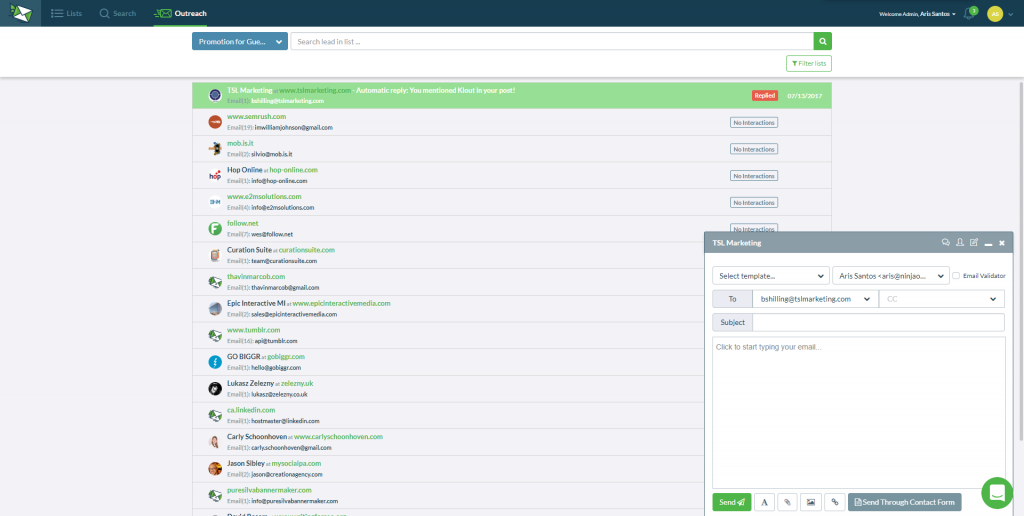
Before, you’ll get a small pop-up inbox like the one below, which keeps disappearing every time you need to do some other actions:
This time, we made a more intuitive inbox that will make multitasking faster and more convenient for you.
Here’s how it’s going to look like:
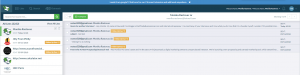
To go into a bit more detail, here are the features our updated NinjaOutreach inbox will have:
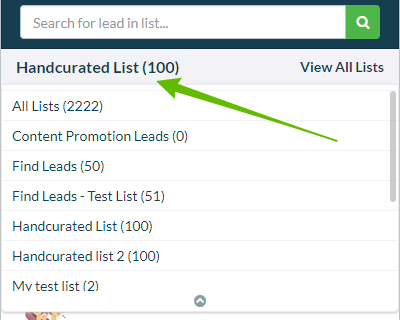
Selective list loading
By default, all leads are automatically displayed when you open your inbox. The latest added leads or conversations, whichever is available, will be at the top. If you want, you can then filter this display by choosing a specific list of leads to view and act on.
Lead management
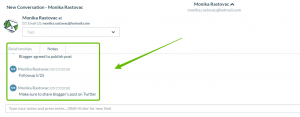
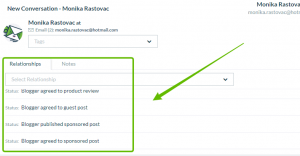
You can now add custom relationship status, notes, and tags to each lead you’re replying to on the go, all without leaving your inbox view.
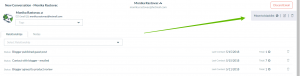
Blacklisting leads
You can now also blacklist a lead right from your inbox with one click of a button. No more extra steps needed.
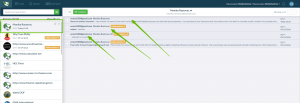
Message history
Clicking on a lead shows your message history with that lead on the right side of your inbox. You’ll get a bigger view with no overlapping windows compared to the smaller one in the old pop-up inbox.
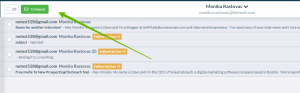
New message compose window
In the new inbox, clicking a lead will take you to a wider message composition window. In this window, you’ll get a better view of all the actions you need to take. You can also respond or follow up directly with any lead while viewing your message history. Just click the Compose button.
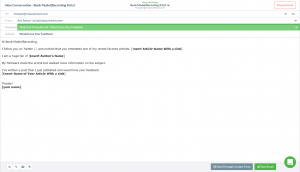
We know how open rates can drop for outreach emails that have no subject line. Still, even the best of marketers can forget, and that’s why we worked to add a simple solution in-app.
Because we want to make sure that no users of ours ever send outreach messages without a subject line, we’ve added a pop-up notification to our new inbox. This pop-up will remind you to write a subject line first before sending your outreach email.
We also understand what a hassle it can be to spend time writing a well-crafted outreach template only to have it accidentally deleted because of a wrong click.
So, we created a simple solution for that, too!
Now, if you move from one lead to another accidentally when the message you’re typing is not yet complete, you’ll get a pop-up notification!
The pop-up will prompt if you’d like to finish and send what you’re writing first before moving to a different lead. This adds a layer of protection to keep you from accidentally losing any work you’ve already started.
And that’s it for now!
We hope you like these improvements to your NinjaOutreach app’s inbox.
As always, we appreciate your comments and feedback.
If you encounter any issues or have questions with the new inbox, just let our Support Ninjas know by clicking on the chat bubble on the lower right side of your screen.
Finally,if you want to suggest other features or would like to point out deficiencies in others, let us know here.
We’re grateful for your continued patronage. Rest assured that we’re always on the lookout for more ways to improve influencer outreach and make things easier for you!
The post NinjaOutreach Product Update News: New Inbox! appeared first on NinjaOutreach.
source https://ninjaoutreach.com/news-inbox/
Monday, 14 May 2018
Friday, 11 May 2018
Infographic Ideas for Linkbuilding
When it comes to link building, the more options you have and the higher number of strategies you’re willing to employ, the better.
Below, we’ll dive deep into a subject many SEO experts and marketers tend to overlook, despite its great potential: infographics.
If you’ve never seen the point of using infographics for link building before, then the information below may change your mind…
What are infographics?
An infographic is a graphic that contains information— hence the name! Most infographics will be:
- Fact-based. Infographics are a great way of providing information in a simple, easily-digested form.
- Genuinely interesting. Infographics can be used to both educate and to entertain.
- A great example of this is the infographic on Disney villains and color psychology.
- Readers learn something, and they’re entertained by what they have learned.
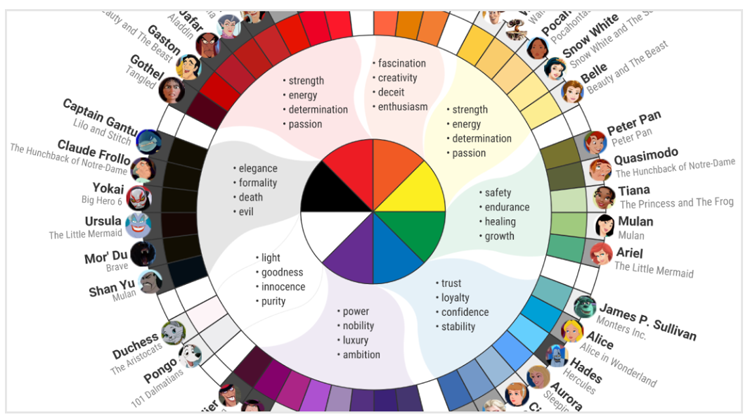
- Infographics contain between 10 and 30 pieces of information, split into smaller groups and sub-sections for readability.
- Modern infographics are also able to incorporate newer design elements with animated and interactive features, such as this Game of Thrones infographic.
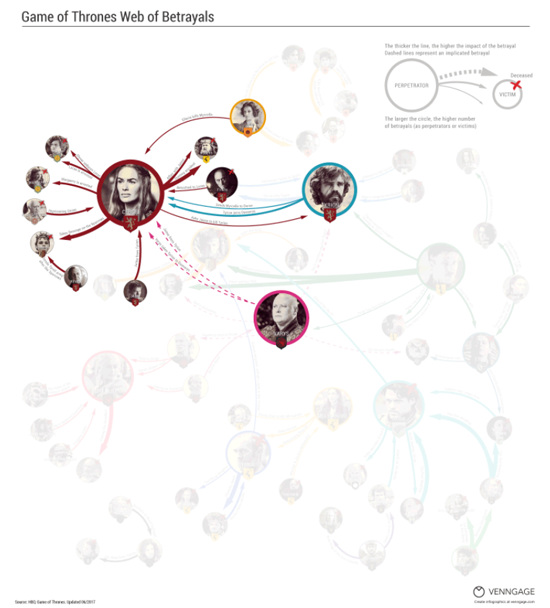
These elements help to increase shareability and give the information provided a contemporary dimension.
For a simple answer, infographics are essentially an article presented in image form— and they can be a great string to your link building bow.
Are infographics popular?
Yes, both for web users and marketers. In fact, research has shown that people are 30 times more likely to read infographics than a text-based article— and that’s not a typo, it really does say thirty.
Why are infographics useful for link building?
Infographics are used for link building for a variety of reasons.
The fact that they are popular for numerous reasons should alone make you keen to give them a try.
- Infographics can increase web traffic by 12%.
- Content that is posted along with relevant visual images (which an infographic is) are able to generate 650% more engagement than standard text posts.
- Infographics can help to build your brand as an authoritative source on a particular topic.
- Social media engagement is improved with infographics.
What kind of impact can an infographic really have?
To answer this question, we’re now going to take a more in-depth look at what an infographic can do in terms of link building.
We’ll be focusing on an infographic that was actually about infographic design: you can see the infographic itself here.

The effect that this infographic produced for the company behind it is, frankly, overwhelming. The stats speak for themselves:
- The infographic was embedded on 80+ websites, all of which contained a backlink to the creator.
- The infographic was pinned on Pinterest 130k+ times.
- The infographic had 600k+ views on Imgur.
- The infographic produced 145 live backlinks in total and 33 live referring domains.
- High authority links were obtained from HubSpot, Marketland Land, Ragan, and DesignTAXI— all of whom have DA 70+.
A single infographic was about to generate these kinds of results, which is staggering when compared to conventional forms of link building.
If you’re concerned this was a one-off success, then don’t be. There are plenty of other infographic case studies that demonstrate just how powerful a tool infographics are.
For example, this case study is about an infographic that led to a link from CNN and other authority sites.
Based on these compelling results, it’s easy to conclude that infographics need to be a part of your link building strategy.
How can you create infographics for your own link building purposes?
If the above stats have convinced you of the potential value of an infographic, you’re going to want to start the ball rolling on creating an infographic of your own.
The first step is choosing a topic. This, unfortunately, is easier said than done, but there are a few aspects you’ll want to keep in mind:
- Infographics seek to inform and potentially entertain, so you need to choose a topic that you can educate people on.
- The topic you choose should be relevant to your niche. Remember, one of the major upsides of infographic link building is that it can help establish your site as an authoritative voice within the niche, so relevance is key.
- The topic must be able to be visually represented. As a result of this, most infographics tend to be based on statistics and data.
- However, there are exceptions to this rule. Infographics on common grammar mistakes, for example, are not strictly data but they are informative— and they tend to be popular, too.
- The authority and reliability of an infographic are increased if you can find links that back up the information held within the infographic. So, if you are writing an infographic about internet user demographics, you can enhance the infographic if you are able to cite data from the Pew Research Center.
If you’re struggling, here are a few ideas you might want to consider.
- Subjects such as bullying, mental health, and poverty are also good choices for infographics. Some infographic designers specifically recommend that you choose emotive subjects that are likely to get people talking and wanting to share the article, so look within your niche to find an area people may have an emotional connection to.
- Explainers are always a good use of an infographic. Pick a new service and explain how to use it, providing step-by-step instructions and solving common queries. As an example, you could do an infographic about how to use Spotify. To find common queries about the subject, you can just Google: “in Spotify, how do you…” and wait for the search suggestions to pop up. Your infographic can then be designed to answer these frequent queries.
- You could also consider newsworthy items for your infographic. For example, if new legislation is passed, you could put together an infographic along the lines of: “What does [new legislation] mean for you?” and explain it in detail.
What information should be included?
One of the great benefits of infographics is that there aren’t really any rules so you can include whatever information you think is relevant.
However, for maximum effect, it’s preferable to consider the following:
- Only choose information that is accurate.
- Do not include information that could be considered to be subjective or biased. Instead, stick to facts that can be backed up by relevant data (and cite them wherever possible).
- Use the information that can be presented in short, easily-read chunks. Remember: one of the key benefits of infographics is that they are easier to read and remember than standard text. You don’t want to produce an infographic that is basically an article in graphic form, as this negates that benefit. Keep sections short, simple, and to the point.
Your infographic can be as long or as short as you need it to be. It’s best to choose a size of the infographic that reflects the information you have available.
You want to cover the topic in-depth, but you don’t want to include tenuous information in an effort just to make the infographic as long as possible.
How do I find a designer for my infographic?
You can hire an infographic design from some online sites, including Fiverr, Freelancer, and Upwork. If you’re handy with PhotoShop, you might even be able to create the design for yourself.
The golden rules for infographic design are:
- Clean
- Efficient
- Bright
- Easily read font
That aside, the design is largely down to your personal preferences.
What do you do with an infographic when it has been created?
When you have your infographic designed to your satisfaction,, you now have to put it to good use.
Your first step is to upload your infographic to your own site.
At the base of the infographic, include an infographic embed code that allows users to easily share the infographic on their own site.
There are plenty of embed code generators online: you could try this one, or install a WordPress plugin that performs the same function.
You also want to use an image sharer app that encourages viewers to share the infographic as they wish.
When the infographic is loaded onto your site and shareable, the real work begins.
- Advertising. It pays to promote your infographic with advertising. The more people that see it, the better.
- Social media. Link to your infographic on all of your social media accounts. Then, in a second update, post the infographic itself in the hopes of generating shares.
- Social sites. Share your infographic on sites such as Reddit, Digg, and other sites that allow user-generated content.
Outreach. Finally, infographic outreach is just as important as outreach for text posts. The more sites that share your infographic, the better. Look to outreach to blogs that are relevant to your niche and/or will provide an authority backlink. - Infographic link building outreach. An infographic is nothing without the right promotion. So to get it seen, you’ll need a highly effective tool like NinjaOutreach to help you promote your infographic. An efficient infographic link building promotion in detail is another story altogether, so to get that info, check out this NinjaOutreach guide on infographic link building promotion. In it, you’ll learn how to build more links using infographics by first finding social influencers and bloggers. You’ll then learn how to schedule an outreach campaign (complete with automated follow-ups) to promote your infographic. Finally, you can get examples and templates that you can use (and that are also used by professional marketers like Brian Dean from Backlinko.)
Benefits of using infographics
When searching online for facts and statistics, infographics are a favored option for online marketers and content writers to enhance the appearance of their own posts.
- Infographics are visually appealing. Infographics are more attractive than printed words, they combine images, colors, movement, and content that naturally draw the eye. Infographics enable us to quickly take in what's important.
- Infographics are easily shared and shared more often. Infographics are amazingly shareable for use around the web. For instance, an infographic distributed on a WordPress blog or website usually has the option for an embed code. This makes it very easy to be placed on another site with a link back to yours.
- Infographics can increase brand awareness because they are so visually appealing. Infographics can be used to reinforce your brand by using regular colors, shapes, and messages, along with your logo.
- Infographics can help improve your SEO. A stylish infographic will drive individuals to your site, and they will often share or link back to it. When you get more links back to your website, generally, your website will increase in rank.
In conclusion
The benefits of infographics for link building are undeniable.
While infographics tend to take a little more work than text forms of marketing and link building, they also have the potential to offer a far higher return on investment.
If you’ve never conducted a link building campaign using infographics before, now might be the time to give it a try and experience this powerful tool for yourself.
Paul Granger is a content writer at https://websitepromoter.co.uk/, a site that helps online businesses grow their reach online with better ROI using the right SEO services & PPC strategies.
The post Infographic Ideas for Linkbuilding appeared first on NinjaOutreach.
source https://ninjaoutreach.com/infographic-ideas-for-linkbuilding/
Wednesday, 9 May 2018
The Top 8 Social Media Conferences to Book in 2018
We’ve already seen countless algorithm updates from the likes of Instagram and Facebook. Yet, as communication trends and preferences continue to evolve, so too will our social platforms. The question is, how do you get ahead of the curve?
While reading up on the latest articles and news releases is always recommended, social media conferences could be the ultimate way to supplement your knowledge. Where else can you learn from some of the best minds in your field, network with fellow marketers and geek-out over digital strategies?
Social media conferences are the perfect excuse to get out of the office and learn about your industry. Plus they’re a great way to fill up your social feeds with some interesting snaps!
If you’re hoping to fill your schedule with a few social media events, you’ve come to the right place. We’ve organized some of the biggest and best social media conferences into the must-attend list for 2018. Stick with us all the way to the bottom of the article for some tips on where to visit in 2019 too!
1. Gartner Digital Marketing Conference: May 15-17
If you consider yourself to be on the cutting edge of social media conferences, then the Gartner event is ideal for you. This digital marketing experience is perfect for customer experience professionals, marketing leaders and senior social managers.
The event covers some of the latest tools and trends intended to help you become a better marketer. Speakers include professor of cognitive neuroscience, Tali Sharot, and CEO of Edelman, Richard Edelman.
Ask the Analyst: The Impact of Privacy and the #GDPR on Personalization is just one of several analyst sessions being offered at #GartnerDMC this year. Check out the rest here: https://t.co/otkPDfCSAm pic.twitter.com/SZeFWoS2u1
— Gartner Events (@Gartner_Events) May 1, 2018
2. Social Media Week LA: June 12-14
Set as the three primary pillars for Social Media Week LA, Learn, Experience and Connect will be the main topics of discussion. This major event is one of the biggest for social media marketers and managers to dig in deep into the industry. While Social Media Week New York has already passed, many are getting prepared for the second flagship event this summer in LA.
Some of the main speakers to look for include: Rosa Walker of Hulu, Hillary Levine Power of Super Deluxe and Rosette Pambakian of Tinder.
10 Reasons to Register for Social Media Week LA 2018 https://t.co/pIif89hzXQ #SMWLA pic.twitter.com/RIXPxmPSoJ
— Social Media Week (@socialmediaweek) April 13, 2018
Each year, the Social Media Week event is hosted in its three flagship cities: Los Angeles, New York and London. However, the crew doesn’t stop there. If you’re looking for something a little closer, check out its list of 2018 conferences in satellite cities such as Milan, Rome, Zurich and so many more! New cities are added each year, so see if the next SMW event is happening around you!
3. Frost & Sullivan MindXchange: June 16-18
The Frost & Sullivan MindXchange conference is an excuse to get nerdy with your campaigns. It pursues the “complete reinvention of marketing” and hosts plenty of speakers and industry insight in the three-day event in Nashville, Tennessee. Bringing together marketing leaders from around the world, MindXchange discusses actionable insights and important strategies for the changing nature of the digital world. It’s followed by a “Marketing Impact” report released on July 19th each year.
The sheer number of people taking part in this conference is mind-boggling. It features speakers like Scott Harkins of FedEx, Burges Karkaria of Intel and Andrew Malcolm of Evernote.
@AMANashville we are bringing a great event to town! 19th Annual Marketing Impact 2025: A Frost & Sullivan Executive MindXchange, July 16 – 18, 2018 | Loews Vanderbilt Hotel | Nashville, TN https://t.co/68uBIv1iEK Any B2B Marketers or Agencies interested in learning about it?
— Greg Rossi (@GregRossi_Frost) March 1, 2018
4. ANA Digital & Social Conference: July 25-27
The ANA Conference keeps modern marketers on top of the latest social and digital trends. Covering evolutions from the first half of the year and predictions for the second half, it’s the ideal way to transition into Q3 and Q4 of your business.
This will be the 9th annual ANA conference and will take place in Rancho Palos Verdes, California. Here the ANA Digital & Social Conference will feature top social media leaders covering topics like AI, influencer marketing, virtual reality, content marketing and chatbots.
Good news! Registration for the 2018 ANA Digital & Social Media Conference, being held in Rancho Palo Verdes, Calif., is now open. Check out the agenda here: https://t.co/O0DkNHiyVA#ANADigital
— ANAmarketers (@ANAmarketers) March 16, 2018
5. Inbound: September 4-7
The agenda for Inbound 2018 isn’t set in stone yet. However, we do know it’s taking place in Boston. This exciting marketing event has already hosted speeches from Seth Godin, Michelle Obama and Rand Fishkin. You definitely can look forward to some great keynotes for this conference!
Additionally, one of the great things about Inbound is that it isn’t all business. If you’re hoping to have a little fun while you learn about the state of digital marketing, this is the event for you. Inbound comes with food truck lunches, happy hours and nightly parties too.
We’re ecstatic to announce the first speakers for INBOUND18! Don’t miss Ava DuVernay, Chimamanda Ngozi Adichie, and Mo Gawdat on stage this September. #INBOUND18 pic.twitter.com/LnEBZZ7lpu
— INBOUND (@INBOUND) April 4, 2018
6. Content Marketing World: September 5-8
The ultimate place for companies to learn everything they need to know about content is here. Content Marketing World is a highly-sought after summit based in Cleveland, Ohio. Every year new speakers join the amazing roster to talk all things content. This year, you can expect to hear from Kate Santore of Coca-Cola, Linda Boff of GE and even Joseph Gordon-Levitt.
CMWorld 2018 gives brands all the marketing materials and support they need to take an enhanced content strategy back to their team. That includes an insight into the latest social trends too.
She's known for her roles on SNL and 30 Rock. And this September, we'll learn the secrets behind Tina Fey's prolific comedy creation on- and off-screen. Join us as she headlines Content Marketing World. https://t.co/3ZdgUlkEGO #CMWorld pic.twitter.com/dFAg4Fe5kW
— Content Marketing (@CMIContent) April 24, 2018
7. EVENTtech: November 12-14
More than 1,000 marketers are set to attend EVENTtech in Las Vegas this year. The conference explores how brands use social media to enhance in-person and live experiences. Coming to you from Event Marketer, the summit is the must-see digital marketing conference of the year.
There are over 100 classes and workshops to attend and countless exciting activities. Visitors can even enjoy exploring some of the latest interactive tools and apps in the industry.
That's a wrap! See you next year back at The Paris, November 12-14. Registration is now open for EventTech 2018! Lowest rates on sale now. https://t.co/jFeulq86A4 #EventTechLive #eventprofs pic.twitter.com/xvz9VrQJCB
— Event Marketer (@EventMarketer) November 16, 2017
8. Social Fresh: December 5-7
Easily one of the more exciting social media conferences on this list is the 2018 Social Fresh Conference. Thanks to its exceptional list of speakers, it’s a must-attend event for those budding or well-experienced in the field. Hosted in Winter Park, Florida, you can expect to hear from Duke University, IBM and many other leading companies. The tickets are affordable too so you won’t have to worry about breaking the bank.
This year, the conference will cover all the most up-to-date changes and training in the social sphere. It’s designed to get you ready for 2019 and ensure your marketing efforts are on track.
Reserve your Social Fresh 2018 ticket today. Prices go up tomorrow. Save $600 off the door price.
>> https://t.co/TeydI7KHKM pic.twitter.com/pw31gYH5RD
— Social Fresh (@socialfresh) April 24, 2018
Social Media Conferences to Start Planning Around in 2019
If you’re a little late to the party and missed a few events this year, don’t worry. There are more incredible social media conferences to attend in 2019 too. While we don’t have the dates for these events just yet, they’re worth watching out for when you’re planning next year’s calendar.
Growth Hackers
Usually taking place in San Diego, California, the Growth Hackers Conference is a one-day conference, covering some of the most crucial information on how to build your business in the year ahead. At this summit, you discover unique insights into how to grow your team and brand. The experience is hosted by Sean Ellis, the person who first coined the term “growth hacker” in 2010. You can sign up for their mailing list to get the latest information about Growth Hackers 2019 dates, speakers, location and more.
The Biggest List of Takeaways From #GHConf17: https://t.co/a2ImI6oVYy
— GrowthHackers (@GrowthHackers) May 3, 2018
Social Media Strategies Summit
One of the most popular go-to social media conferences is the the Strategies Summit. This event helps companies build social plans, content creation campaigns and much more. If you want to learn about the impact technology has on branding and social communication, this is the conference for you. Often hosted in San Francisco during the first couple of months of the year, the event is a great place for networking and learning how to take your social strategy to the next level.
That's a wrap! A big thank you to all of our speakers, attendees, and sponsors that joined us in Chicago! We loved seeing our #SMSsummit community! Till the next time, we all see each other. pic.twitter.com/bk3OkY3UbA
— Social Media Strategies Summit (@SMS_summit) April 26, 2018
Social Media Marketing World
Hosted by Social Media Examiner, Social Media Marketing World takes place every year in San Diego. With conference dates usually set in February or March, SMM World offers empowering insights from digital experts around the globe. Some of the attendees for 2018 included Jay Baer, Guy Kawasaki and Mari Smith. Along with incredible keynote speeches, there’s plenty of networking parties and workshops to enjoy here. Register to get up-to-date information on 2019’s conference.
Have you visited our speaker page recently to see all of the amazing speakers that will be at SMMW18? Check it out here: https://t.co/DdrR11q11W Who are you looking forward to the most? #SMMW18
— Social Media Marketing World (@SMMWConference) February 21, 2018
Digital Marketing Innovation Summit: February 27-29
Where better to sink your teeth into digital marketing than the Big Apple? The New York Digital Marketing Innovation Summit brings together marketing leaders from PepsiCo, Google, Nike and other major enterprise businesses in the space. Get a glimpse into current trends and check out the latest technology for marketers at this event.
While you’re here, you’ll discover how you can create an omnichannel experience for your audience. You might even have a chance to boost your popularity with a bit of professional networking. Registration is already live for next year’s summit!
How did your #digitalmarketing tactics perform last year? Did you get the #ROI you expected? It's time to #bebetter and #learn some new skills! Join us at the #DigiMarketing Innovation Summit in New York on Feb 27 & 28: https://t.co/dVAITeN4C5 pic.twitter.com/JqIk5w02Ek
— Innovation Enterprise (@IEGroup) February 1, 2018
Exploring the Best Social Media Conferences
A conference is more than just a room packed full of over-heated marketers. It’s a chance to network, explore new ideas and empower your brand. This year, try adding a few of the events above into your calendar. You’ll be surprised how much you learn and grow when you connect with the peers in your space.
This post The Top 8 Social Media Conferences to Book in 2018 originally appeared on Sprout Social.
source https://sproutsocial.com/insights/social-media-conferences/